RADIUS and LDAP aren’t rivals. In most networks, they work together to do different jobs. Understanding the difference is an important step to getting your authentication architecture right.
By Alan DeKok, CEO, InkBridge Networks
People often ask me whether they should use RADIUS or LDAP for authentication. It’s a reasonable question - both protocols can verify a user’s identity, both are open standards, and both turn up in conversations about network access.
But the comparison is a bit like asking whether you should use a key or a lock: they’re different parts of an authentication system.
RADIUS and LDAP are not competing protocols. They do different jobs, and in most enterprise networks you need both. This article explains what each one does, where they overlap, and, crucially, why there are things RADIUS can do that LDAP simply cannot, and vice versa.
What is LDAP?
LDAP (Lightweight Directory Access Protocol) is a protocol for reading and writing data in a directory service. Think of it as a structured, searchable database of identity information: user accounts, group memberships, e-mail addresses, phone numbers, departmental attributes, and passwords.
That is, LDAP servers are databases. Their primary purpose is to store data. In many cases they can do more than that, but the focus of an LDAP server is still data storage.
The most widely deployed LDAP implementation is Microsoft Active Directory. OpenLDAP is the common choice in Linux environments. Both store user data in a hierarchical tree structure, and both are highly optimised for fast read operations - LDAP was designed to answer queries quickly, at scale.
LDAP servers are often used to authenticate users. The core operation here is the credntial “bind”: a client application submits credentials to the LDAP server, which checks them against the directory and returns either success or failure. Many corporate applications (web portals, HR systems, developer tools) use LDAP bind directly to verify user credentials, group membership, etc.
What LDAP is not: LDAP is not a network access protocol. LDAP servers manage users, and (sometimes) authenticate users. LDAP servers do not control who gets access to the network. Most importantly, LDAP servers never support EAP (Extensible Authentication Protocol), that is used in 802.1X for enterprise Wi-Fi.
LDAP servers can store VLAN information, bandwidht policies, etc. But they can’t apply those policies, because that role is taken by AAA protocols such as RADIUS.
What is RADIUS?
RADIUS (Remote Authentication Dial-In User Service) is a networking protocol built around the AAA framework: Authentication, Authorisation, and Accounting.
Authentication confirms identity: is this user who they claim to be?
Authorisation determines access: what is this user allowed to do? RADIUS returns policy attributes to the network device: which VLAN to assign, what bandwidth limits apply, which access control list to enforce.
Accounting logs the session: who connected, when, for how long, and how much data they transferred. This data feeds audit trails, billing systems, and security investigations.
RADIUS sits between the network device (an access point, VPN gateway, switch, or router - collectively called the Network Access Server, or NAS) and the database or identity store. In most deployments, the RADIUS doesn’t store user credentials. Instead, it queries an external database such as LDAP or Active Directory, or SQL – in order to get the users credentials and policies. The RADIUS server makes the access decision success or fail, and returns the appropriate policy to the network device.
Without exaggerating much, the only mechanism used by network devices to control network access is RADIUS. Sure, Diameter exists, but most enterprises won’t be issuing their own SIM cards, so Diameter isn’t relevant there.
The key difference between LDAP vs RADIUS
LDAP servers store data. RADIUS mediates network access. They solve related problems, but not the same one.
Here’s a comparison of what each protocol does in practice:
Why LDAP alone cannot secure your Wi-Fi
One common issue that surprises people who are unfamiliar with RADIUS is that LDAP cannot do Wi-Fi authentication. That’s not a limitation of the software, but a matter of protocol design. You can’t get your LDAP server to do WiFi authentication by changing vendors, or adding configuration options. It’s simply impossible.
Enterprise Wi-Fi uses the 802.1X standard, which requires EAP. EAP is a framework that supports certificate-based authentication (EAP-TLS), tunnelled authentication (PEAP, EAP-TTLS), and other methods that provide strong security without transmitting credentials in plaintext. EAP conversations happen between the client device, the wireless access point, and an authentication server. The EAP conversations are carried in RADIUS. Which means that the authentication server must be RADIUS.
In contrast, LDAP has no EAP support. A Wi-Fi access point will never send EAP packets over an LDAP connection – that option simply does not exist in the LDAP protocol. Some access point vendors have added proprietary workarounds that allow the AP to make simple username/password checks against LDAP, but these checks bypass EAP entirely. These checks are used only for captive portal authentication. i.e. where a web server on the AP communicates with the LDAP server.
In that case, RADIUS isn’t involved. That means no certificate authentication, no MFA, no VLAN assignment based on group membership, and no accounting. For a home network, this is perhaps acceptable. For an enterprise, not an option.
The same logic applies to most VPN gateways and network switches that enforce 802.1X on wired ports. The result is that if your network infrastructure uses standard authentication protocols, it speaks RADIUS.
Worth subscribing to.
Worth reading.
Our weekly newsletter covers network authentication tips, how-tos, security vulnerabilities, free resources, standards updates, and industry news. (All stuff you should stay up to date on!)
How RADIUS and LDAP work together
In practice, RADIUS and LDAP are almost always used together. The typical architecture looks like this:
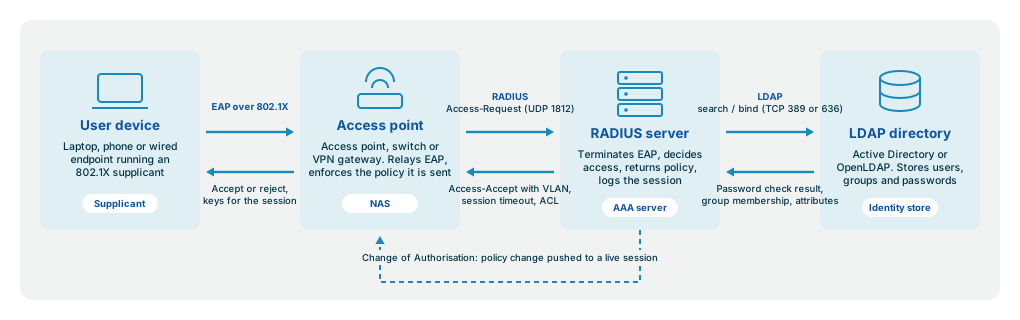 In a typical enterprise network, the user device talks 802.1X to the access point, the access point talks RADIUS to the RADIUS server, and the RADIUS server talks LDAP to Active Directory or OpenLDAP.
User device → Access point or VPN gateway → RADIUS server → LDAP / Active Directory
The user authenticates to the network via EAP and RADIUS. The RADIUS server receives the authentication request, and queries the organisation’s LDAP directory to verify credentials and to retrieve group membership. The RADIUS server makes an access decision and returns the appropriate policy attributes - VLAN assignment, session timeout, bandwidth limits - to the network device.
This architecture lets each protocol do what it does best. LDAP handles identity storage and fast lookups. RADIUS handles the network conversation and policy enforcement. They are complementary layers, not alternatives.
There’s one RADIUS capability in this arrangement that is easy to overlook: Change of Authorisation (CoA). When a user’s status changes in the LDAP directory - an account is deactivated, a group membership is revoked, a service tier is upgraded - the RADIUS server can detect that change via LDAP’s replication interface and immediately push that change via a CoA message to the network device.
The result: a terminated employee’s device is kicked off the network the moment HR deactivates the account in Active Directory, not the next time they try to log in. That is something that LDAP alone cannot do.
What about TACACS+?
TACACS+ (Terminal Access Controller Access Control System Plus) is a Cisco-developed protocol that also handles AAA, but it was designed for a specific use case: authenticating administrators to network infrastructure - switches, routers, firewalls.
Like RADIUS, TACACS+ can operate as an AAA protocol (though RFC 2829 disagrees). Unlike RADIUS, TACACS+ has extended support for “command authorization”, where every command entered by an administrator is validated against the TACACS+ servers.
But as with LDAP, TACACS+ can’t transport EAP, and therefore can’t be used to control network access for end users. TACACS+ is limited to controlling administrator access to network devices.
In a typical enterprise you might see all three in use: LDAP as the identity store, RADIUS for end-user network access (Wi-Fi, VPN, wired 802.1X), and TACACS+ for administrator access to network devices. They serve different layers of the same infrastructure.
When to authenticate directly via LDAP
LDAP binding is appropriate for application-level authentication where the application has a direct relationship with the directory and no network-layer access decision is needed. Internal web applications, developer tools, Linux server login via SSSD, and similar use cases are natural fits for LDAP.
The distinction to keep in mind: LDAP is the right choice when an application needs to look up or verify identity data directly. RADIUS is the right choice when a network device needs to control who access the network - particularly when that decision involves policy attributes, session accounting, or EAP-based authentication methods.
Most organisations end up using both, because they need both kinds of access control.
Need more help?
If your team is wrestling with network configuration, a troubleshooting problem you cannot resolve, or a system that needs to be more resilient, we can help. InkBridge Networks has 25 years of expertise - we wrote the standards, maintain FreeRADIUS, and have seen every failure mode there is. Reach out to request a quote.
Related Articles

Can you use FreeRADIUS and Active Directory together?
The short answer is Yes, FreeRADIUS and Active Directory are compatible with each other. However, there are some constraints and implications for the rest of the system. Like any technology choice, Active Directory has its advantages and disadvantages, as well as consequences for how other network components need to be set up.

How to set up a wireless RADIUS server for secure Wi-Fi authentication
When setting up a Wi-Fi network at home, you typically set up an SSID and password, accept the defaults for any other options, and be done with it. (In some cases, these are done for you by your service provider — you don’t even have to think.) You share the password with family and visitors, and everyone is happy.